Saturday, November 17, 2012


Wednesday, November 14, 2012
It's Time to Connect
The theme of connecting has been prominent in my work recently. As a district, we rolled out Microsoft Lync to all staff. With Lync, staff are able to connect and collaborate with voice, video, chat, and desktop sharing. As I began meeting with teachers about using Lync, some interesting conversations began to happen. Ideas for collaborating and connecting classrooms were stretching people's thinking. I look forward to see how Lync will be used to connect in my district.
Yesterday, I participated in a great #edchat about grading and report cards. This is a topic that is being discussed in my district now so the timing could not have been better. It was great to have a Twitter discussion and get viewpoints of others outside of my district. Fresh perspectives and new connections add to my knowledge and thinking.
Last night, I conducted a Personal Learning Networks session. This was the first time that this topic has been formally presented in an official district workshop. Being connected is something I find so important to my work and I only hope I was able to deliver the message about being a connected educator.
All of this has me thinking about how connected or unconnected we are in my district. How do I deliver the message that being connected adds to professional growth? It seems that taking the first step is terrifying...like we are stepping off a cliff into thin air. There is the fear of failure and the unknown. How do we help educators take that first step into the connected world?
For that answer, I will go to my connected world.
Thoughts?
Yesterday, I participated in a great #edchat about grading and report cards. This is a topic that is being discussed in my district now so the timing could not have been better. It was great to have a Twitter discussion and get viewpoints of others outside of my district. Fresh perspectives and new connections add to my knowledge and thinking.
Last night, I conducted a Personal Learning Networks session. This was the first time that this topic has been formally presented in an official district workshop. Being connected is something I find so important to my work and I only hope I was able to deliver the message about being a connected educator.
All of this has me thinking about how connected or unconnected we are in my district. How do I deliver the message that being connected adds to professional growth? It seems that taking the first step is terrifying...like we are stepping off a cliff into thin air. There is the fear of failure and the unknown. How do we help educators take that first step into the connected world?
For that answer, I will go to my connected world.
Thoughts?
Saturday, November 10, 2012
Wednesday, November 7, 2012
Student Goal Setting and Data Tracking with Excel
Last week, I attended a PLC academy in my district. The focus of this day was how do we know when students have learned. So naturally, the discussion was around the topic of assessment. There were many good assessment discussions happening...formative vs. summative, exit slips, etc. As the day was winding down, the discussion moved to how students can play a bigger role and take more responsibility for their learning. Students should be setting their own learning goals based on assessment data but how can they do this?
One of my schools created a drawing of how they would like students to track their assessment scores in math. Their ideas was to break the assessment into the 6 focus areas and have the students record how they did in each focus area. From there, the students could write goals based on their data. I suggested that Excel to track and display the data. Within Excel, I think two different methods could be successful.
The first method is to setup a table and graph ahead of time in Excel. The students would each have their own copy of this file. After each assessment, the students can enter their scores into the table. The graph will automatically update (when creating the graph, I highlighted all the cell in the chart and this is how it automatically updates) and the students can see their progress in each area. From there, students can write their goals based on real data.
The other method is to use color coding and not use a graph. In this example, I setup three categories for the color (0% = red, 50%= yellow, 100%= green). The students would enter their scores and the cells would automatically turn to the appropriate color. If a score was not one of the three listed above, then the cell would be a shade of the closest color (75% turns the cell into a lighter shade of green). After entering scores, students could see which areas are in the red and yellow and write their goals accordingly.
No matter how you are tracking data, get the students involved. Students will become more invested in the process and that should hopefully lead to more learning and achievement. This is just one strategy teachers can use to get students more actively engaged in their learning.
Here is a link to the Excel spreadsheet. Hope you find it helpful.
One of my schools created a drawing of how they would like students to track their assessment scores in math. Their ideas was to break the assessment into the 6 focus areas and have the students record how they did in each focus area. From there, the students could write goals based on their data. I suggested that Excel to track and display the data. Within Excel, I think two different methods could be successful.
The first method is to setup a table and graph ahead of time in Excel. The students would each have their own copy of this file. After each assessment, the students can enter their scores into the table. The graph will automatically update (when creating the graph, I highlighted all the cell in the chart and this is how it automatically updates) and the students can see their progress in each area. From there, students can write their goals based on real data.
 |
| Using Excel to Graph Data |
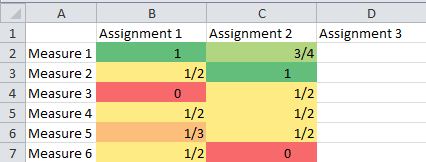 |
| Using Color Coding in Excel |
Here is a link to the Excel spreadsheet. Hope you find it helpful.
Saturday, October 27, 2012
Blog Posting (weekly)
-
- I'm signed up to take a class. I'd be happy to share my experiences with anyone interested. - post by Rebecca Stull
-
Kozzi | EXCLUSIVE FREE STOCK IMAGES | High-quality Stock Photos, Video and Illustrations.
Tuesday, October 23, 2012
Electronic Writing Portfolios with Evernote and IPEVO
Everyday, I find myself bookmarking sites and reading tweets, blog posts, etc. about great uses of technology in the classroom. One of the areas I have been paying close attention to is the use of Evernote in the classroom. Evernote and its integration with the IPEVO document camera makes it a powerful combination to be used as an electronic writing portfolio. So how would that work?
First, you would setup individual notebooks for each student in Evernote. To do this, click File and then New Notebook. By setting up a notebook for each student, teachers can share each individual notebook with parents. This makes for great home communication. To share a notebook, right click on the notebook and choose Share Notebook.
From there, you can invite parents to view the notebook via email or you choose to make a public link. That link could then be sent to the parents. As you continue to update the portfolio, parents can use the same link to view their child's portfolio. Students could also see their portfolio and look at how they have grown as a writer throughout the year.
Once the notebooks are setup in Evernote, it is now time to start adding student work to the electronic portfolio. Images can be captured and inserted into notes within Evernote in a multitude of ways. If you have an IPEVO document camera (for around $70 it is a great deal), then this process is simple because Evernote integrates into the P2V software that comes with the IPEVO document camera.
Here is how it works:
When in the IPEVO software, you click on the Evernote tab and sign into your Evernote account. Once signed in, you click "Take a snapshot".

Then, snap your picture(s).

Finally, give your note a title, choose the notebook you want to put it in, and click Send to Evernote. You can take multiple pictures and then attach them all to a note.

First, you would setup individual notebooks for each student in Evernote. To do this, click File and then New Notebook. By setting up a notebook for each student, teachers can share each individual notebook with parents. This makes for great home communication. To share a notebook, right click on the notebook and choose Share Notebook.
 |
| Share a Notebook |
From there, you can invite parents to view the notebook via email or you choose to make a public link. That link could then be sent to the parents. As you continue to update the portfolio, parents can use the same link to view their child's portfolio. Students could also see their portfolio and look at how they have grown as a writer throughout the year.
 |
| Invite viewers or create public link |
Here is how it works:
When in the IPEVO software, you click on the Evernote tab and sign into your Evernote account. Once signed in, you click "Take a snapshot".
Then, snap your picture(s).
Finally, give your note a title, choose the notebook you want to put it in, and click Send to Evernote. You can take multiple pictures and then attach them all to a note.
The IPEVO and Evernote integration makes the process of creating a digital portfolio so much easier. Try it out and let me know what you think!
Saturday, October 20, 2012
Blog Posting (weekly)
-
Augmented Reality (AR) Solar System Magic Book | Augmented Reality in Education
-
- i viewed it :D - post by jaden furll
- hello, love it! - post by Alexandra Reder
Subscribe to:
Posts (Atom)